
Historically, DevOps is an approach aimed at improving collaboration between developers to accelerate application development, deployment, and maintenance cycles. It relies on automation, continuous integration (CI), and continuous deployment (CD) to ensure fast and efficient software delivery. Today, DevSecOps—short for Development, Security, and Operations—is a natural and increasingly adopted evolution of DevOps. This approach integrates security as a core component of the software development lifecycle, ensuring that security is considered from the design phase onwards.
Key principles of DevSecOps:
- Continuous security integration: This pillar aims to include security from the start of development by integrating automated tests and analyses into the CI/CD pipeline, thereby ensuring early vulnerability detection.
- Automated security controls: Automation allows for the rapid identification and remediation of vulnerabilities by reducing human intervention, ensuring smoother and more secure application deployment.
- Ongoing collaboration between developers, operations, and security teams: A successful DevSecOps approach relies on a culture of collaboration where every stakeholder in the development process accounts for security, fostering effective communication and shared responsibility.
How Cyberwatch can support your environment's DevSecOps lifecycle
During the build / CI phase
The build phase is the stage where a project's source code is transformed into an executable element, often in the form of a Docker image. This phase is critical for integrating security checks early on and preventing the spread of vulnerabilities into production environments.
Cyberwatch intervenes at this stage as an external scanner to analyze Docker images and identify vulnerabilities directly from a continuous integration (CI) pipeline, whether using GitLab CI/CD or GitHub Actions.
Why integrate vulnerability scanning during the build phase?
- Early flaw detection: Images are scanned as soon as they are created, limiting the spread of vulnerabilities into subsequent environments.
- Automated controls: Every pipeline triggers an analysis without manual intervention, ensuring continuous monitoring.
- Blocking risky images: If critical vulnerabilities are detected, it is possible to prevent the deployment of non-compliant images.
Docker registry scanning
Once images are built and validated, they are stored, shared, and deployed from Docker registries. These registries, whether private or public, facilitate the management, tracking, and deployment of images across different environments.
However, vulnerabilities can appear over time in images that were initially compliant and are currently in use in production. To anticipate these risks, Cyberwatch provides continuous monitoring and performs regular scans of your images, allowing for the detection of any new vulnerabilities that violate your security policies.
Thanks to this automated monitoring, you are alerted immediately if a critical vulnerability is discovered, allowing you to act quickly to implement the necessary corrective measures.
With Cyberwatch, you can:
- Continuously list the images in your Docker registry;
- Automatically delete images that are no longer referenced in your registry;
- Add and continuously scan newly detected images to identify potential vulnerabilities;
- Receive alerts based on your security criteria, notifying you immediately if critical vulnerabilities appear.
Workshop: How to perform a Docker registry scan from Cyberwatch
Imagine a widely used Docker registry, such as Harbor, where all your organization's images are stored. With Cyberwatch, you can launch a specific discovery on Harbor or any other registry:

When configuring a discovery, you can define the Docker registry to be analyzed and enable automatic registration of detected images.
In addition, Cyberwatch allows you to automatically remove assets from Cyberwatch that correspond to images no longer present in the registry, ensuring your inventory is always up to date.
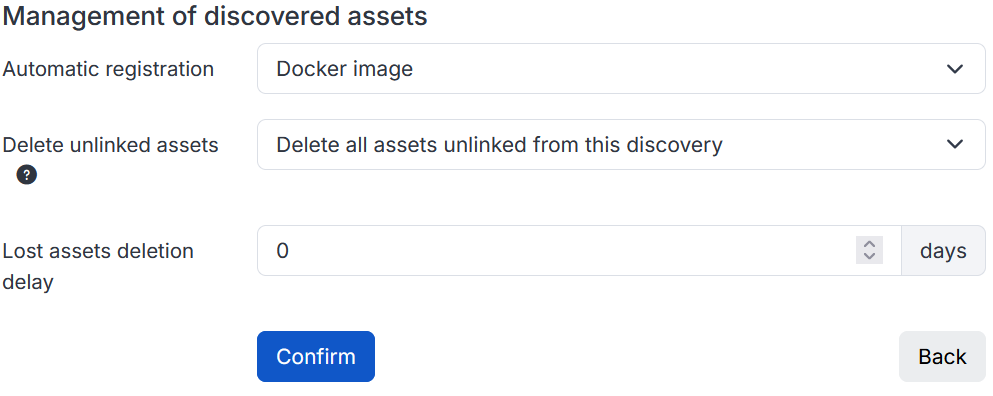
Once the discovery is complete, if the automatic registration option has been enabled, the detected images will be added directly to Cyberwatch, where they will be analyzed to identify any potential vulnerabilities. This discovery can be performed periodically by Cyberwatch, which will ensure the inventory remains consistent with the actual state of the registry and report any vulnerabilities found.
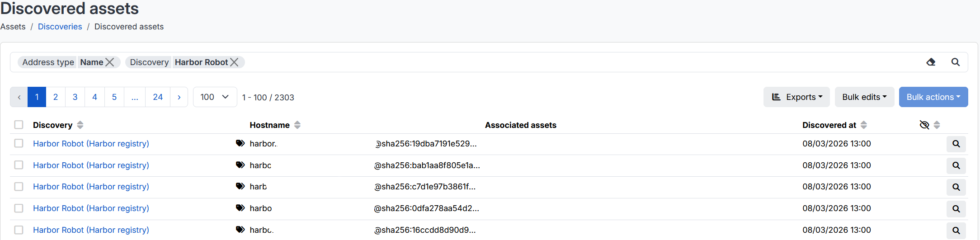
To stay informed about new vulnerabilities resulting from these analyses, it is also recommended to set up alerts, which can be configured for the scope of your Docker images and will email you a list of impactful vulnerabilities based on your prioritization criteria.
Harbor scanning
In the previous section, we explored how to monitor a Docker registry directly from Cyberwatch. However, in the case of Harbor, the topic can be approached from the other direction, allowing you to scan Docker images directly from Harbor by using Cyberwatch as an external vulnerability scanner.
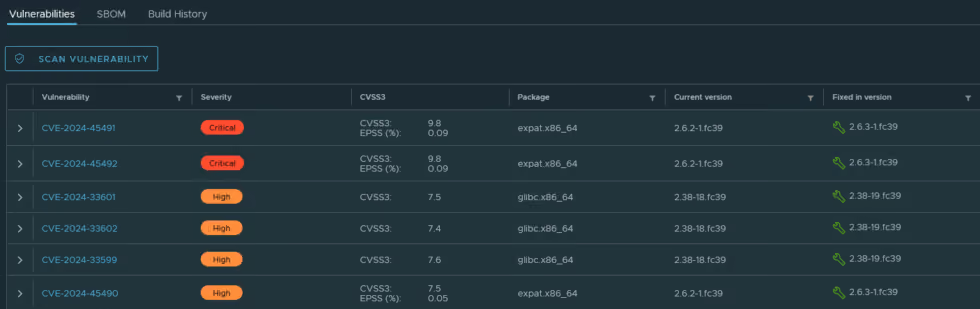
In practical terms, you will be able to run a vulnerability scan and view the results directly from the Harbor interface. This configuration helps improve automation and security analysis for images, with the goal of detecting vulnerabilities quickly.
Workshop: How to add Cyberwatch as an external vulnerability scanner
The procedure presented is fully described in the documentation.
The first step is to configure Cyberwatch as a vulnerability scanner in Harbor. The configuration details, including the necessary API and authentication keys, can be obtained from the Cyberwatch administration section.
Once the scanner is configured, you can select it as the default:

This way, you can run vulnerability scans on your chosen images directly from the Harbor interface and view the results immediately.
Information sharing, exports, and metrics
In a DevSecOps approach, managing, processing, and sharing information effectively is just as important as analyzing risks and vulnerabilities.
Indeed, even the most optimal analysis is only effective if the information is properly communicated to the relevant stakeholders. The ability to extract, structure, and leverage scan results helps optimize vulnerability remediation and ensures effective monitoring of the security measures in place.
To simplify this management, Cyberwatch offers several mechanisms for data retrieval and visualization:
- Export generation: Various types of exports can be generated from Cyberwatch, such as management summaries, detailed technical reports, or raw data reports for a specific asset, a group of assets, or your entire infrastructure.
- Alert configuration: You can receive automatic notifications via email, webhooks, or directly on Teams when critical vulnerabilities are detected or based on your own custom criteria;
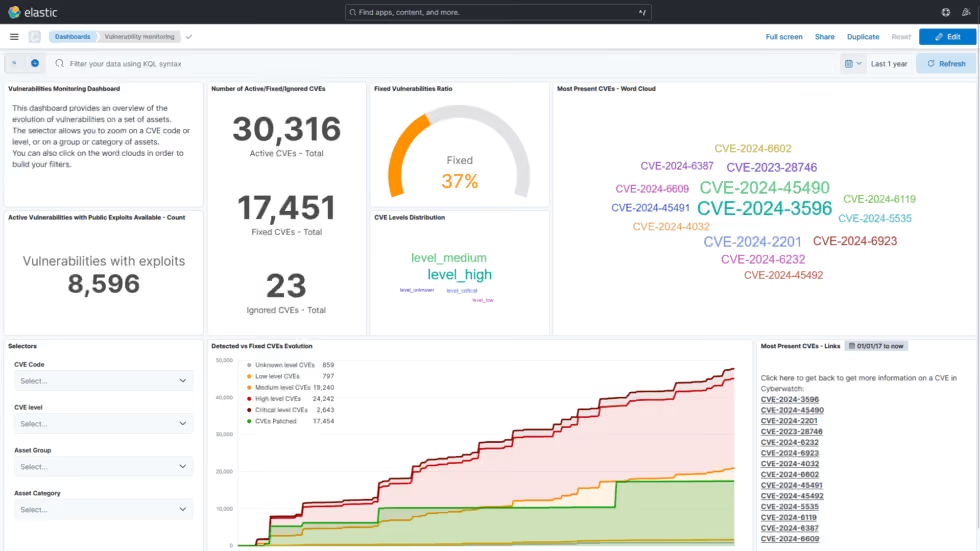
- Kibana: the tool Kibana is automatically integrated into Cyberwatch, featuring pre-configured and customizable dashboards for tracking security metrics.
Going further
Want to scan your Docker images before they are even deployed to your registry?
We will soon be publishing an article showing you how to integrate Cyberwatch vulnerability scanning into a CI/CD pipeline to identify vulnerabilities as early as the build phase!