
On December 9 and 10, 2021, Julien, a security administrator at an e-commerce SME, was preparing to deploy a new application scheduled for the following week. When he returned on December 13, 2021, he discovered too late that Log4Shell, which had been disclosed on December 9, had already been exploited on his servers.
A simple patch released on December 10 would have prevented the attack, but because he wasn't informed, data had been leaked and the system was compromised.
In cybersecurity, every hour counts. That is why Cyberwatch allows you to be natively informed within the hour of any CVEs present on your assets that are deemed critical by CISA-KEV and CERTFR authorities.
With this, Julien would have received an email informing him of the presence of Log4Shell on his IT system, allowing him to avoid the resulting damage.
Cyberwatch alerts help you optimize your time
In an environment where IT security is a priority, it is crucial to know when and how to react to new vulnerabilities and to stay vigilant regarding assets that fall outside of your supervision.
Since version 14.0 (September 2024), Cyberwatch has introduced an alert feature that allows users to receive personalized notifications to manage their IT infrastructure more proactively.
In this article, we present concrete use cases for alerts, explain how to configure them, how they work, and how to adapt them to your specific needs. Through a step-by-step tutorial, you will be able to set up alerts that keep you informed about the risks and health of your IT system.
Why use Cyberwatch alerts?
Cyberwatch alerts are an excellent way to be notified in real time about critical elements of your system, such as new vulnerabilities, security flaws, or even unsupervised assets.
Rather than constantly checking the tool, you can rely on these notifications to stay responsive to any changes in your infrastructure.
The various notification channels
Alerts can be sent through different channels so that you never miss important information; here are a few examples:
- Notifications within the Cyberwatch interface
- Team chat channels
- Ticketing service
How do Cyberwatch alerts work?
1. Creating the alert (the filter)
The first step is to create the alert in Cyberwatch. This is done in the Settings > Alerts section. Cyberwatch lets you choose exactly what you want to monitor.
For example, you can set an alert to be notified when a vulnerability is detected in your assets, when an OS becomes obsolete, or when a server is not receiving the necessary monitoring.
2. Setting up the integration (formatting the alert)
Alerts alone are not enough. To view them, you need to configure an integration. This is done from the Administration menu. Cyberwatch natively supports HTTP and SMTP protocols. These integrations allow you to send alerts to various systems, such as emails or messages via webhooks for any application with a REST API.
3. Alerts are only triggered by new information
To avoid being flooded with repetitive information, Cyberwatch only triggers alerts when there is new information or a change in your infrastructure. This keeps you informed of developments without wasting your time.
Your turn: create a Cyberwatch alert!
Now that we have covered the basics of how alerts work, let's dive into creating concrete alert examples.
Case 1: Receive an email if a server certificate is about to expire
A TLS certificate expiration leaves a gaping hole in your digital fortress. Without this security key, your data becomes an easy target for cybercriminals. Imagine the consequences: interception of sensitive data, identity theft, and increased vulnerability to attacks. Being informed and acting in time is the shield that protects your company from invisible threats.
Below is our protocol for being alerted by email when your certificates are about to expire:
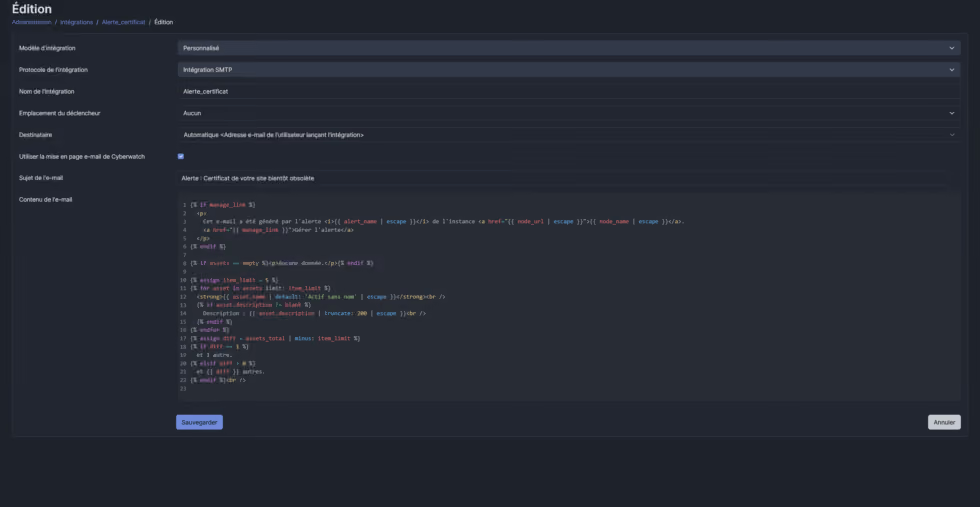
Step 1: Creating the SMTP integration
- Go to Administration > Integrations and click Add.
- Select SMTP as the protocol and use the Liquid code below to format the email:
{% if manage_link %}
  <p>
    Cet e-mail a été généré par l'alerte <i>{{ alert_name | escape }}</i> de l'instance <a href="{{ node_url | escape }}">{{ node_name | escape }}</a>.
    <a href="{{ manage_link }}">Gérer l'alerte</a>
  </p>
{% endif %}

{% if assets == empty %}<p>Aucune donnée.</p>{% endif %}

{% assign item_limit = 5 %}
{% for asset in assets limit: item_limit %}
  <strong>{{ asset.name | default: 'Actif sans nom' | escape }}</strong><br />
  {% if asset.description != blank %}
    Description : {{ asset.description | truncate: 200 | escape }}<br />
  {% endif %}
{% endfor %}
{% assign diff = assets_total | minus: item_limit %}
{% if diff == 1 %}
  et 1 autre.
{% elsif diff > 0 %}
  et {{ diff }} autres.
{% endif %}<br />
The result will look like this:
Step 2: Configuring the scheduled alert
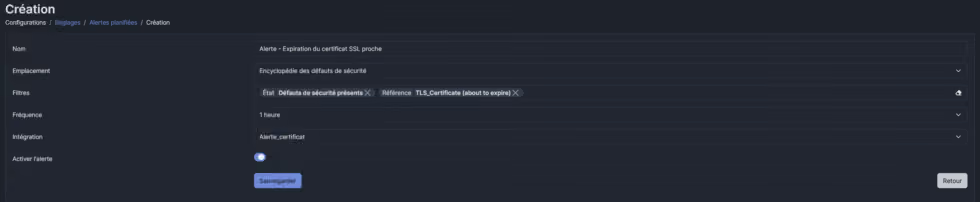
- Go to Settings > Scheduled alerts > Add.
- Select the alert location "Encyclopedia – Security flaws".
- Filter by the desired security flaw (in this case, "TLS Certificate (about to expire)").
- Associate it with the SMTP integration you just configured.
The result will look like this:
Case 2: Receive a Teams alert if a server in your Azure environment is not being monitored
When an asset, including those deployed in Azure, is not monitored by Cyberwatch, it creates a dangerous blind spot in your security setup.
In a cloud environment like Azure, where resources are dynamic and scalable, this gap is particularly concerning.
Without continuous monitoring by Cyberwatch, potential vulnerabilities in these Azure assets remain undetected, exposing your organization to increased attack risks. Being alerted when these assets are not being monitored allows for quick action to bring them under surveillance, thereby strengthening your organization's overall cybersecurity posture.
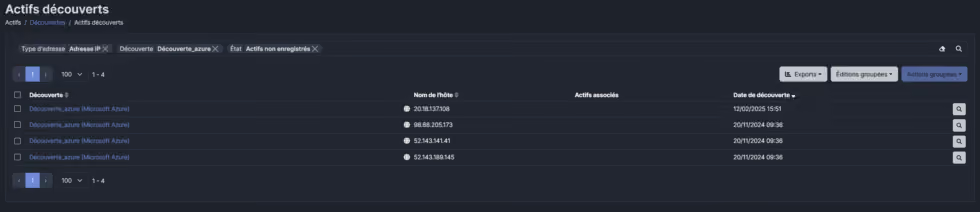
Below is the protocol for receiving alerts regarding Shadow IT in your discoveries:
Prerequisites
- Have an Azure discovery configured with a recurrence schedule
- Have the necessary permissions in Teams to create a channel and add an application
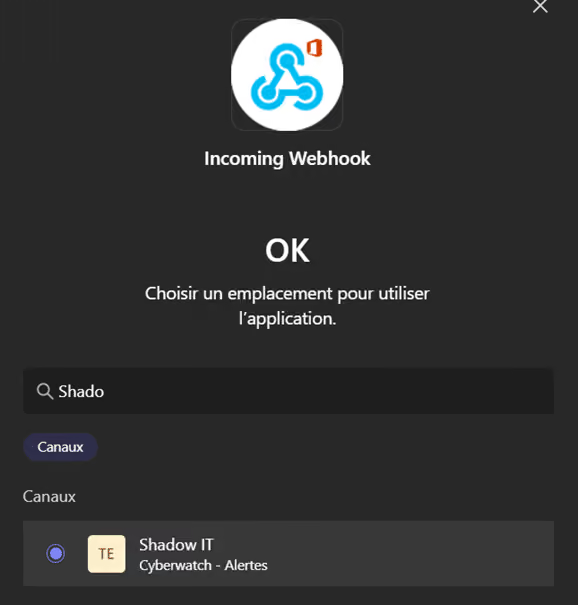
Step 1: Configure Microsoft Teams
- Create a team dedicated to Cyberwatch in Teams.
- Next, create a specific channel to receive Shadow IT alerts.
- Add a Teams connector (Incoming Webhook).
- In your Teams channel, add an "Incoming Webhook" connector and configure it to receive messages.
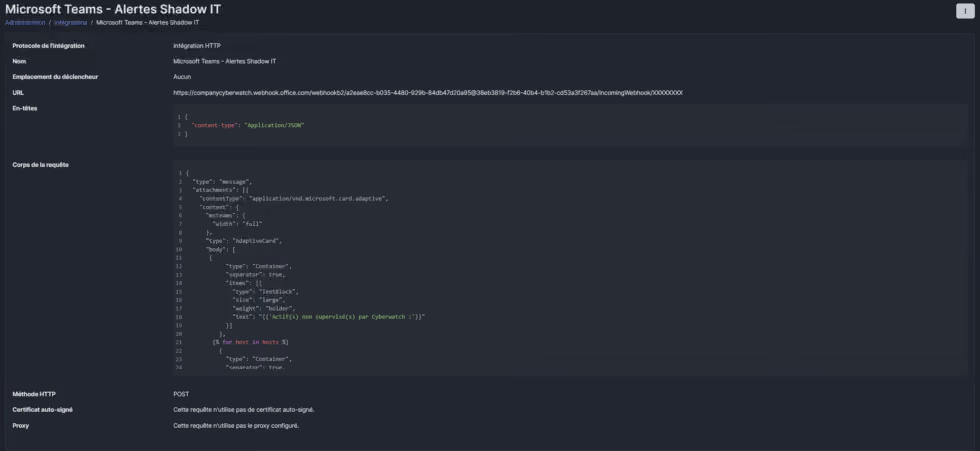
Step 2: Create the HTTP integration
- Go to Administration > Integrations and click Add.
- Select HTTP as the protocol and use the Liquid code below to format the message.
{
  "type": "message",
  "attachments": [{
    "contentType": "application/vnd.microsoft.card.adaptive",
    "content": {
      "msteams": {
        "width": "full"
      },
      "type": "AdaptiveCard",
      "body": [
       {
            "type": "Container",
            "separator": true,
            "items": [{
              "type": "TextBlock",
              "size": "large",
              "weight": "bolder",
              "text": "{{'Actif(s) non supervisé(s) par Cyberwatch :'}}"
            }]
          },
        {% for host in hosts %}
          {
            "type": "Container",
            "separator": true,
            "items": [{
              "type": "TextBlock",
              "size": "large",
              "weight": "bolder",
              "text": "{{ host.hostname | default: 'Actif sans nom' | escape | json_safe }}"
            }]
          },
        {% endfor %}
      ],
      "$schema": "http://adaptivecards.io/schemas/adaptive-card.json",
      "version": "1.5"
    }
  }]
}
It should look like this:
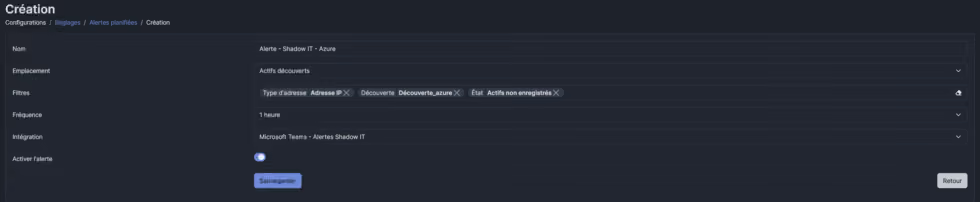
Step 3: Configuring the scheduled alert
a) Create the alert directly from a Cyberwatch search.
b) Configure the alert recurrence and choose the integration created previously.
Alert ideas to maximize your asset management
Cyberwatch alerts are extremely flexible and can be tailored to your specific needs. Here are some alert scenarios to set up for better management of your IT infrastructure:
- Your company uses a server exposed to the Internet. A new critical CVE with an active exploit is published. Thanks to the Cyberwatch platform's alert system, you receive an immediate notification and a ticket is automatically created in Jira, ServiceNow, GLPI, or Hackuity. Your cybersecurity team is informed and can react quickly to apply a patch before an attack occurs.
- Your cybersecurity team closely monitors emerging threats. A new addition is detected in the CERTFR ALE or CISA KEV database. You automatically receive an email informing you of this new critical vulnerability. This allows your team to quickly assess the potential impact and anticipate the necessary protective measures.
Stay informed, effortlessly!
With Cyberwatch platform alerts, track risks and the health of your infrastructure in real time. Easily integrate them with Microsoft Teams or email to receive critical information instantly. No more manual monitoring—stay focused on what matters most.
Activate your alerts now and secure your IT infrastructure.
Need help? Our support team is here to assist you!